
CS2 Map Viewer Brings Interactive GOTV Demo Analysis to the Browser
Rewatching a specific round from a Counter-Strike 2 match can be frustrating. Loading a demo through the CS2 console is slow and cumbersome, disrupting the analysis flow. A new tool aims to change that. The CS2 Map Viewer lets players analyze GOTV demos directly in the browser via an interactive 2D map.
CS2MapViewer.com – FREE
The viewer focuses on making demo analysis fast and accessible. Instead of launching the game, users can upload a demo file and review rounds visually.
What does the viewer offer?
The CS2 Map Viewer comes with a feature set designed for both casual review and serious analysis.
- Drag and drop demo upload. Users can upload .dem or .dem.zst files directly in the browser. Parsing and processing happen automatically.
- Interactive 2D map view. Player positions, viewing directions, health, equipment, and team affiliation are shown in real time.
- Timeline and tick navigation. Rounds can be jumped to precisely, with full control over playback, rewind, and fast-forward.
- Kill feed and round overview. Score, round phase, timer, and kills are displayed alongside the map.
- Support for all active maps. Including Dust2, Mirage, Inferno, Anubis, Nuke, Ancient, Vertigo, and more.
- Screenshot export. Key moments can be captured directly from the viewer for later use.
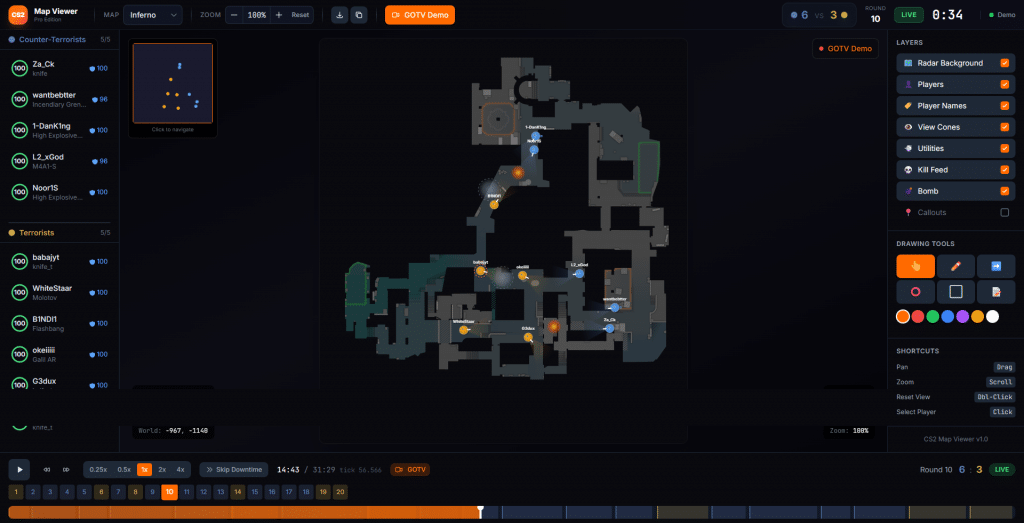
How it works
Uploaded demos are displayed on the start page as clean preview cards showing map name, number of rounds, and total playtime. With a single click, the selected demo opens in the viewer.
Playback is handled through a WebSocket connection that streams game states frame by frame. This approach avoids loading the entire demo into memory and keeps performance smooth, even for longer matches.
For users without a demo file, a simulation mode is available to explore the interface and features.
Who is it for?
The CS2 Map Viewer targets a wide range of users.
- IGLs and coaches who want to visually break down strategies, setups, and rotations
- Players reviewing their own matches without launching CS2
- Content creators looking to quickly find scenes and export screenshots
- Analysts who need a clear overview of positioning and round flow
The Armory: A Revolutionary Update to Counter-Strike
About the 6th October Update
CS2 November 3rd Update: Workshop Enhancements and Gameplay Balancing
About Author

CS2.eu
CS2.eu is your go-to source for all things Counter-Strike 2. As avid fans and active participants in the Counter-Strike community, our team is dedicated to providing the most accurate and comprehensive information regarding the latest addition to the Counter-Strike franchise. Our passion for the game drives us to deliver the latest news, updates, strategy guides, and tips to players around the world. At CS2.eu, we believe in fostering a strong and inclusive community of players, and we work tirelessly to offer content that enhances the gaming experience for both novice and experienced players alike. Whether you're looking for in-depth guides on game mechanics, updates on the latest tournaments, or want to stay up-to-date on patches and gameplay changes, CS2.eu is your trusted partner. We're not just about delivering information; we're about sharing our love for Counter-Strike 2 with the community that shares our passion. Join us as we delve into the exciting world of Counter-Strike 2, and let us enhance your journey through the game's intricacies and evolving landscapes. Welcome to CS2.eu – Your gateway to the world of Counter-Strike 2.