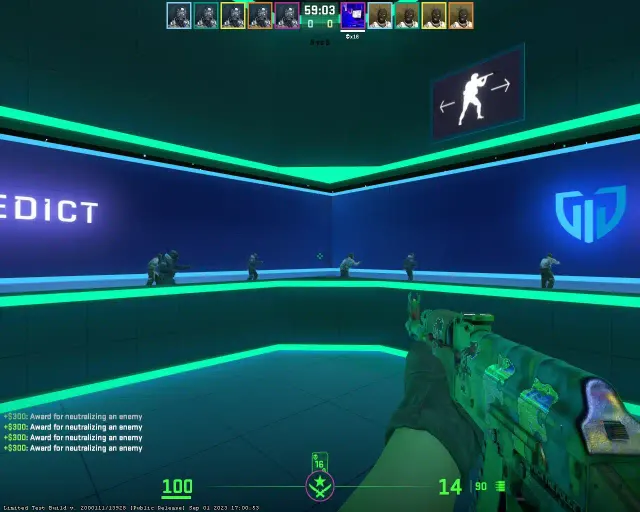
Best CS2 Crosshair Settings & Codes in 2026 (Pro Player Settings)
Your crosshair is one of the most important settings in Counter-Strike 2. A well-configured crosshair can dramatically improve your aim, target acquisition, and overall game sense.
Archived guide · Last edited 25 Mar 2026. Game details may have changed since publication.
Best CS2 Crosshair Settings in 2026#
Your crosshair is one of the most important settings in Counter-Strike 2. A well-configured crosshair can dramatically improve your aim, target acquisition, and overall game sense. In this comprehensive guide, we break down the best crosshair settings used by professional CS2 players in 2026 and explain how to find the perfect crosshair for your playstyle.
How to Change Your Crosshair in CS2#
CS2 offers a built-in crosshair customization menu that makes it easier than ever to tweak your settings. Navigate to Settings → Game → Crosshair to access the visual editor. You can also use console commands for more precise control or import crosshair codes directly from other players.
To apply a crosshair code, open the console (~) and use the Share or Import feature in the crosshair settings menu.
Pro Player Crosshair Settings#
s1mple (Natus Vincere)#
s1mple uses a classic static crosshair that prioritizes visibility without clutter:
- Style: Classic Static (4)
- Size: 2
- Gap: -2
- Thickness: 0.5
- Color: Green (1)
- Outline: Yes (0.5)
- Dot: No
ZywOo (Vitality)#
ZywOo opts for a small, precise crosshair ideal for AWP and rifle play:
- Style: Classic Static (4)
- Size: 1.5
- Gap: -3
- Thickness: 0
- Color: Cyan (4)
- Outline: No
- Dot: No
donk (Team Spirit)#
The rising star of CS2 esports uses a clean, minimal crosshair:
- Style: Classic Static (4)
- Size: 2
- Gap: -1
- Thickness: 0.5
- Color: White (7)
- Outline: Yes (1)
- Dot: No
NiKo (G2 Esports)#
NiKo prefers a slightly larger crosshair for better visibility during sprays:
- Style: Classic Static (4)
- Size: 2.5
- Gap: -2
- Thickness: 0
- Color: Green (1)
- Outline: Yes (0.5)
- Dot: No
Crosshair Types Explained#
Static vs Dynamic#
Static crosshairs stay the same size regardless of movement or shooting. Most professional players prefer static crosshairs because they provide consistent visual feedback and do not distract during firefights.
Dynamic crosshairs expand when moving or shooting, giving visual feedback about accuracy. These can help newer players understand when they are accurate, but most competitive players find them distracting.
Dot Crosshairs#
A center dot crosshair (no lines, just a dot) offers maximum precision for players who have excellent crosshair placement. However, it can be harder to track during sprays and may get lost against certain backgrounds.
Tips for Finding Your Perfect Crosshair#
- Start with a pro player crosshair as a baseline, then adjust to your preference
- Use a contrasting color that stands out on most maps — green, cyan, and yellow are popular choices
- Keep it small but visible — a crosshair that is too large obscures targets, while one too small gets lost
- Enable the outline for better visibility on bright surfaces
- Test on multiple maps — your crosshair should be visible on Dust2 bright areas and Inferno dark corners
- Stick with it — do not change too often, give yourself at least a week before switching
Best Crosshair Colors for Visibility#
Based on testing across all competitive maps, here are the most visible crosshair colors:
- Cyan (4) — Excellent contrast on most surfaces, rarely appears in map textures
- Green (1) — The classic choice, great overall visibility
- Yellow (2) — Stands out well but can blend with some utility effects
- White with outline — High contrast everywhere but can be harsh on the eyes
Frequently Asked Questions#
What crosshair do most CS2 pros use?
Most professional CS2 players use a Classic Static crosshair (Style 4) with a small size (1.5-2.5), negative gap, and either green or cyan color. The most popular settings are size 2, gap -2, thickness 0.5 with outline enabled.
How do I import a crosshair code in CS2?
Open the crosshair settings in CS2 (Settings, Game, Crosshair), click the Share button, and paste the crosshair code. You can also use the console to apply crosshair settings directly.
What is the best crosshair color for CS2?
Cyan (Color 4) and Green (Color 1) provide the best visibility across all competitive maps. Cyan stands out on most surfaces and rarely appears in map textures.
Conclusion#
The perfect crosshair is ultimately personal preference, but starting with proven pro player settings gives you an excellent foundation. Remember: the best crosshair is the one you are most comfortable with. Experiment with the settings above, find what works for your playstyle, and stick with it. Consistency is key to building muscle memory and improving your aim in CS2.
Related CS2 Guides#
Something worth updating?
Spotted an outdated detail or something we should add?