CS2 Map Viewer Brings Interactive GOTV Demo Analysis to the Browser
Rewatching a specific round from a Counter-Strike 2 match can be frustrating. Loading a demo through the CS2 console is slow and cumbersome, disrupting the analysis flow.
Archived guide · Last edited 25 Mar 2026. Game details may have changed since publication.
Rewatching a specific round from a Counter-Strike 2 match can be frustrating. Loading a demo through the CS2 console is slow and cumbersome, disrupting the analysis flow. A new tool aims to change that. The CS2 Map Viewer lets players analyze GOTV demos directly in the browser via an interactive 2D map.
CS2MapViewer.com – FREE
The viewer focuses on making demo analysis fast and accessible. Instead of launching the game, users can upload a demo file and review rounds visually.
What does the viewer offer?#
The CS2 Map Viewer comes with a feature set designed for both casual review and serious analysis.
- Drag and drop demo upload. Users can upload .dem or .dem.zst files directly in the browser. Parsing and processing happen automatically.
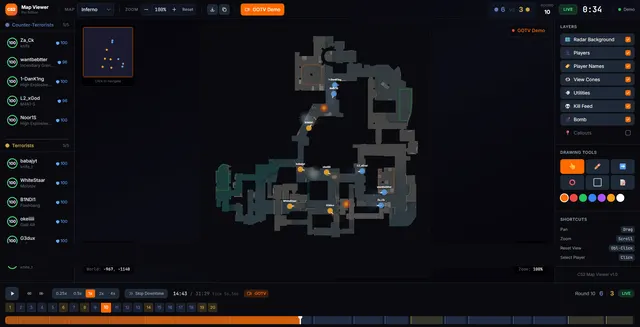
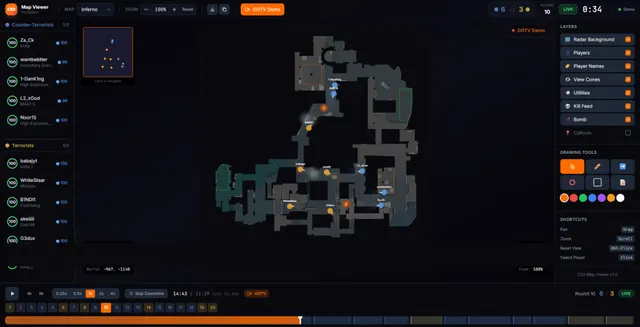
- Interactive 2D map view. Player positions, viewing directions, health, equipment, and team affiliation are shown in real time.
- Timeline and tick navigation. Rounds can be jumped to precisely, with full control over playback, rewind, and fast-forward.
- Kill feed and round overview. Score, round phase, timer, and kills are displayed alongside the map.
- Support for all active maps. Including Dust2, Mirage, Inferno, Anubis, Nuke, Ancient, Vertigo, and more.
- Screenshot export. Key moments can be captured directly from the viewer for later use.
How it works#
Uploaded demos are displayed on the start page as clean preview cards showing map name, number of rounds, and total playtime. With a single click, the selected demo opens in the viewer.
Playback is handled through a WebSocket connection that streams game states frame by frame. This approach avoids loading the entire demo into memory and keeps performance smooth, even for longer matches.
For users without a demo file, a simulation mode is available to explore the interface and features.
Who is it for?#
The CS2 Map Viewer targets a wide range of users.
- IGLs and coaches who want to visually break down strategies, setups, and rotations
- Players reviewing their own matches without launching CS2
- Content creators looking to quickly find scenes and export screenshots
- Analysts who need a clear overview of positioning and round flow
Read Our Latest Guides
Something worth updating?
Spotted an outdated detail or something we should add?